# 世界级用户权限
## 概述
您可以为团队成员、活动协调员或最终用户分配两类用户权限——**世界级权限**和[**区域级权限**](/docs/zh-Hans/opening-the-doors/creating-and-managing-user-accounts/region-level-user-permissions.md)。需要注意的是,这两类权限是相互独立的,各自拥有不同的影响范围和控制领域。在本页中,我们将讨论世界级用户类型。
信息
只有[世界所有者](/docs/zh-Hans/opening-the-doors/creating-and-managing-user-accounts/world-level-user-permissions.md#%E4%B8%96%E7%95%8C%E7%BA%A7%E7%94%A8%E6%88%B7%E7%B1%BB%E5%9E%8B)和[世界管理员](/docs/zh-Hans/opening-the-doors/creating-and-managing-user-accounts/world-level-user-permissions.md#%E4%B8%96%E7%95%8C%E7%BA%A7%E7%94%A8%E6%88%B7%E7%B1%BB%E5%9E%8B)可以访问仪表板。
## 世界级用户类型
拥有高级世界级权限的用户拥有\_适用于整个 Sinewave Campus 世界的广泛权限\_,但\_不一定拥有适用于单个区域的权限\_。拥有高级世界级权限的用户通常拥有允许他们管理 Sinewave Campus 账户、监督活动和上传新内容的权限。

图示:用户类型选择菜单,可通过仪表板 > 管理用户 > 编辑用户访问。
将高级世界级权限视为那些您可以通过[仪表板](/docs/zh-Hans/building-new-worlds/breakroom-dashboard-tour.md)分配和管理的权限可能会有所帮助。
简而言之,当前的世界级用户类型如下:
**所有者**
世界所有者负责管理其账户的[账单详情](/docs/zh-Hans/building-new-worlds/breakroom-dashboard-tour.md#billing),并可以通过仪表板查看其过去的发票。
此外,世界所有者可以:
* 访问[仪表板](/docs/zh-Hans/building-new-worlds/breakroom-dashboard-tour.md)。
* 购买额外的[席位](/docs/zh-Hans/opening-the-doors/seats-and-concurrency.md)、[每日通行证](/docs/zh-Hans/opening-the-doors/seats-and-concurrency.md#daily-passes)和[世界积分](/docs/zh-Hans/opening-the-doors/world-stream/purchasing-and-managing-world-credits.md)。
* 为活动请求[预分配](/docs/zh-Hans/opening-the-doors/world-stream/pre-allocation-campaigns.md)。
* 创建和编辑[区域](/docs/zh-Hans/building-new-worlds/creating-and-managing-regions.md)、[过滤商店内容](/docs/zh-Hans/creating-custom-experiences/filtering-the-sinewave-shop.md)、使用世界[自定义选项](/docs/zh-Hans/creating-custom-experiences/branding-tools.md)。
* 编辑世界上托管的所有[会议](/docs/zh-Hans/exploring-breakroom/using-the-meetings-window.md)。
* 访问平台[分析](/docs/zh-Hans/opening-the-doors/analytics.md)并做出关于[用户隐私和数据收集](/docs/zh-Hans/opening-the-doors/privacy-policies-eulas-and-data-collection.md)的决定。
* 访问所有[审核工具](/docs/zh-Hans/running-your-event/moderator-tools.md)。
* 在世界[离线](/docs/zh-Hans/opening-the-doors/toggling-world-availability.md)时登录。
* [上传内容](/docs/zh-Hans/advanced-tutorials/uploading-your-own-region/pushing-items-to-the-live-server.md)到 Curator 并批准自己的内容。
* [审核](/docs/zh-Hans/advanced-tutorials/uploading-your-own-region/testing-items-on-the-preview-server.md)和[批准](/docs/zh-Hans/advanced-tutorials/uploading-your-own-region/pushing-items-to-the-live-server.md)其他用户上传的内容。
* 修改或覆盖其他用户上传的任何内容。
* 通过[仪表板](/docs/zh-Hans/opening-the-doors/creating-and-managing-user-accounts/world-level-user-permissions.md#assigning-and-revoking-advanced-world-level-permissions)或[CSV](/docs/zh-Hans/opening-the-doors/creating-and-managing-user-accounts.md#importing-and-exporting-user-lists)任命世界管理员并更改用户类型。
**管理员**
世界管理员可以执行与世界所有者相同的许多任务,除了他们无法访问账单信息。他们也不能任命额外的世界管理员。
世界管理员可以:
* 访问[仪表板](/docs/zh-Hans/building-new-worlds/breakroom-dashboard-tour.md)。
* 购买额外的[每日通行证](/docs/zh-Hans/opening-the-doors/seats-and-concurrency.md#daily-passes)和[世界积分](/docs/zh-Hans/opening-the-doors/world-stream/purchasing-and-managing-world-credits.md)。
* 为活动请求[预分配](/docs/zh-Hans/opening-the-doors/world-stream/pre-allocation-campaigns.md)。
* 创建和编辑[区域](/docs/zh-Hans/building-new-worlds/creating-and-managing-regions.md)、[过滤商店内容](/docs/zh-Hans/creating-custom-experiences/filtering-the-sinewave-shop.md)、使用世界[自定义选项](/docs/zh-Hans/creating-custom-experiences/branding-tools.md)。
* 编辑世界上托管的所有[会议](/docs/zh-Hans/exploring-breakroom/using-the-meetings-window.md)。
* 访问平台[分析](/docs/zh-Hans/opening-the-doors/analytics.md)并做出关于[用户隐私和数据收集](/docs/zh-Hans/opening-the-doors/privacy-policies-eulas-and-data-collection.md)的决定。
* 访问所有[审核工具](/docs/zh-Hans/running-your-event/moderator-tools.md)。
* 在世界[离线](/docs/zh-Hans/opening-the-doors/toggling-world-availability.md)时登录。
* [上传内容](/docs/zh-Hans/advanced-tutorials/uploading-your-own-region/pushing-items-to-the-live-server.md)到 Curator 并批准自己的内容。
* [审核](/docs/zh-Hans/advanced-tutorials/uploading-your-own-region/testing-items-on-the-preview-server.md)和[批准](/docs/zh-Hans/advanced-tutorials/uploading-your-own-region/pushing-items-to-the-live-server.md)其他用户上传的内容。
* 修改或覆盖其他用户上传的任何内容。
* 通过[仪表板](/docs/zh-Hans/opening-the-doors/creating-and-managing-user-accounts/world-level-user-permissions.md#assigning-and-revoking-advanced-world-level-permissions)更改子管理员用户类型。
**审核员**
世界审核员拥有对所有审核控件的通用访问权限,因此他们可以审核在任何区域举行的活动。他们无法访问仪表板,除非他们拥有该区域或被授予高级[区域特定权限](/docs/zh-Hans/opening-the-doors/creating-and-managing-user-accounts/region-level-user-permissions.md),否则他们不能管理或编辑任何区域。
世界审核员可以:
* 编辑世界上托管的所有[会议](/docs/zh-Hans/exploring-breakroom/using-the-meetings-window.md)。
* 访问所有[审核工具](/docs/zh-Hans/running-your-event/moderator-tools.md)。
* 在世界[离线](/docs/zh-Hans/opening-the-doors/toggling-world-availability.md)时登录。
* 访问[区域设置](/docs/zh-Hans/building-new-worlds/region-settings.md)以静音和屏蔽滥用用户。
**开发者**
世界开发者可以创建和上传内容到您的世界,并批准其他用户上传的内容。他们还可以使用世界内的区域编辑器编辑现有区域。
世界开发者可以:
* [上传内容](/docs/zh-Hans/advanced-tutorials/uploading-your-own-region/pushing-items-to-the-live-server.md)到 Curator 并批准自己的内容。
* [审核](/docs/zh-Hans/advanced-tutorials/uploading-your-own-region/testing-items-on-the-preview-server.md)和[批准](/docs/zh-Hans/advanced-tutorials/uploading-your-own-region/pushing-items-to-the-live-server.md)其他用户上传的内容。
* 修改或覆盖其他用户上传的任何内容。
* 在[Sinewave 商店](/docs/zh-Hans/getting-started/customizing-your-avatar/using-the-sinewave-shop.md)上列出上传的商品以供销售。
* 访问所有[审核工具](/docs/zh-Hans/running-your-event/moderator-tools.md)。
* 在世界[离线](/docs/zh-Hans/opening-the-doors/toggling-world-availability.md)时登录。
* 访问[区域编辑器](/docs/zh-Hans/creating-custom-experiences/using-the-region-editor.md)。
信息
在授予用户世界开发者权限后,他们需要[登录到 Curator](/docs/zh-Hans/advanced-tutorials/uploading-your-own-region/pushing-items-to-the-live-server.md)并接受条款和条件,然后才能访问[预览网格](/docs/zh-Hans/advanced-tutorials/uploading-your-own-region/testing-items-on-the-preview-server.md)。
**成员**
世界成员占用一个席位,没有任何特殊特权。您可以选择为世界成员分配[高级区域级权限](/docs/zh-Hans/opening-the-doors/creating-and-managing-user-accounts/region-level-user-permissions.md)。
**访客**
世界访客账户在以下情况下创建:
* 您通过[上传 CSV](/docs/zh-Hans/opening-the-doors/creating-and-managing-user-accounts.md#importing-and-exporting-user-lists)创建用户账户,并且未在**类型字段**中指定其他用户类型。
* 在通过上传 CSV 创建用户账户时,您尝试导入的用户数量超过了可用的[席位](/docs/zh-Hans/opening-the-doors/seats-and-concurrency.md)。在这种情况下,额外的用户账户将作为访客创建。
* 用户账户由[Eventbrite](/docs/zh-Hans/opening-the-doors/creating-and-managing-user-accounts/eventbrite-integration.md)或您可能选择的任何自动化注册过程自动生成。
当世界访客账户首次登录时,其账户[状态](/docs/zh-Hans/opening-the-doors/creating-and-managing-user-accounts.md#managing-user-status)将更新为\_活跃\_。成员类型账户及更高级别的账户始终优先于访客账户登录。
## 分配和撤销高级世界级权限
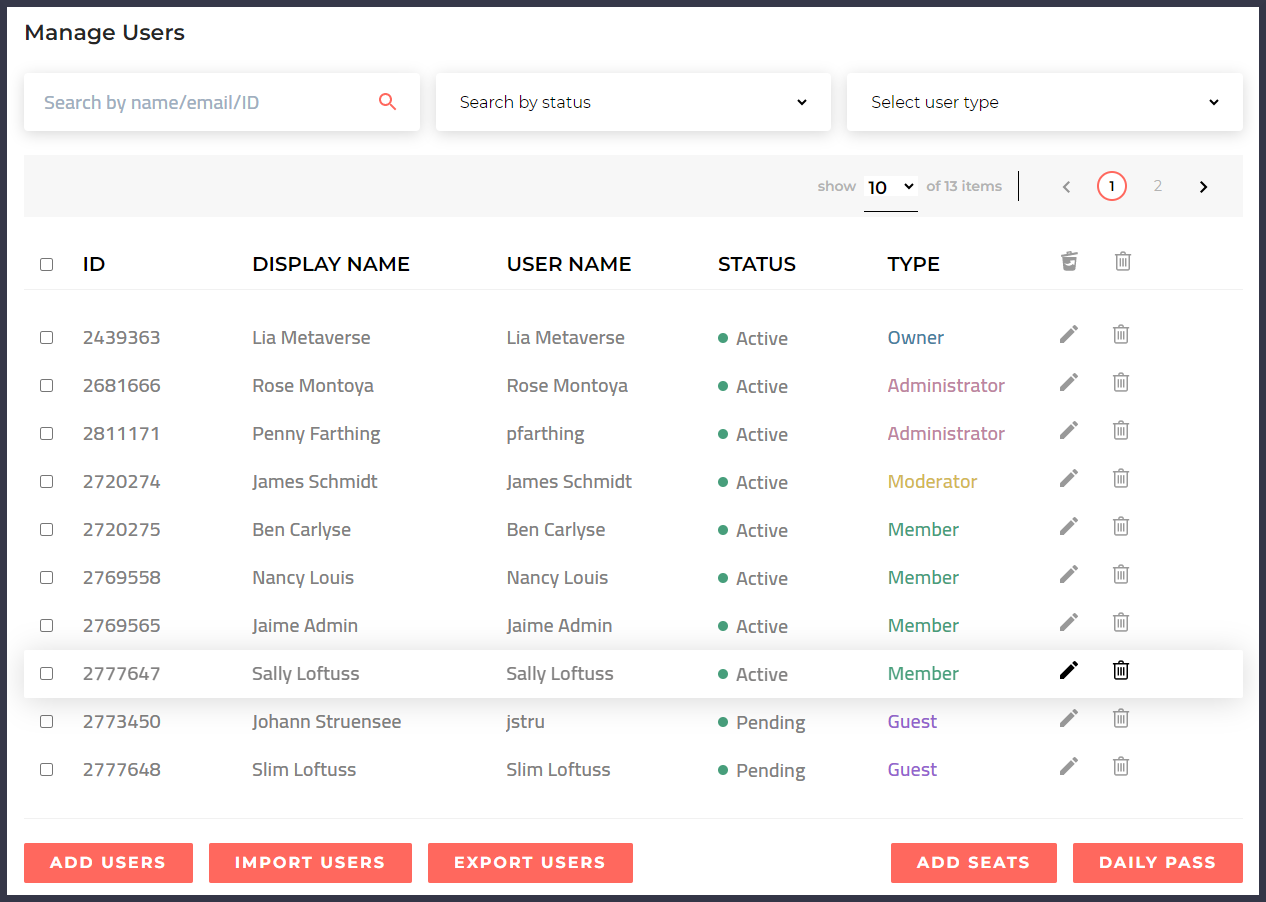
图示:仪表板 > 管理用户选项卡。
您可以通过以下步骤为单个用户分配高级世界级权限。
1. 导航到您的[仪表板](/docs/zh-Hans/building-new-worlds/breakroom-dashboard-tour.md)。
2. 点击**管理用户选项卡**。
3. 找到您要编辑权限的用户名称。(提示:您可以使用**搜索字段**按名称或电子邮件地址搜索。)点击其名称右侧的**铅笔图标**。
4. 在出现的编辑用户窗口中,点击您要分配的**权限类型**。
5. 点击**更新按钮**以保存您的更改。
要撤销高级世界级权限,请重复上述步骤并选择新的用户类型(例如\_成员\_)。您可以在我们的[开门章节](/docs/zh-Hans/opening-the-doors/seats-and-concurrency.md)中了解更多关于[创建和管理用户账户](/docs/zh-Hans/opening-the-doors/creating-and-managing-user-accounts.md)的信息。